Wednesday, June 13, 2012

Chpt 6 - Linux Filesystem Administration


Storage Mgt and Partitions

[root@server01 etc]# fdisk -l
Disk /dev/sda: 64.4 GB, 64424509440 bytes
255 heads, 63 sectors/track, 7832 cylinders
Units = cylinders of 16065 * 512 = 8225280 bytes
Sector size (logical/physical): 512 bytes / 512 bytes
I/O size (minimum/optimal): 512 bytes / 512 bytes
Disk identifier: 0x0002d481

   Device Boot      Start         End      Blocks   Id  System
/dev/sda1   *           1          64      512000   83  Linux
Partition 1 does not end on cylinder boundary.
/dev/sda2              64        7833    62401536   8e  Linux LVM

Disk /dev/mapper/vg_server01-lv_root: 53.7 GB, 53687091200 bytes
255 heads, 63 sectors/track, 6527 cylinders
Units = cylinders of 16065 * 512 = 8225280 bytes
Sector size (logical/physical): 512 bytes / 512 bytes
I/O size (minimum/optimal): 512 bytes / 512 bytes
Disk identifier: 0x00000000

Disk /dev/mapper/vg_server01-lv_root doesn't contain a valid partition table
Disk /dev/mapper/vg_server01-lv_swap: 4227 MB, 4227858432 bytes
255 heads, 63 sectors/track, 514 cylinders
Units = cylinders of 16065 * 512 = 8225280 bytes
Sector size (logical/physical): 512 bytes / 512 bytes
I/O size (minimum/optimal): 512 bytes / 512 bytes
Disk identifier: 0x00000000

Disk /dev/mapper/vg_server01-lv_swap doesn't contain a valid partition table
Disk /dev/mapper/vg_server01-lv_home: 5981 MB, 5981077504 bytes
255 heads, 63 sectors/track, 727 cylinders
Units = cylinders of 16065 * 512 = 8225280 bytes
Sector size (logical/physical): 512 bytes / 512 bytes
I/O size (minimum/optimal): 512 bytes / 512 bytes
Disk identifier: 0x00000000

Disk /dev/mapper/vg_server01-lv_home doesn't contain a valid partition table
[root@server01 etc]#

[root@server01 etc]# mount
/dev/mapper/vg_server01-lv_root on / type ext4 (rw)
proc on /proc type proc (rw)
sysfs on /sys type sysfs (rw)
devpts on /dev/pts type devpts (rw,gid=5,mode=620)
tmpfs on /dev/shm type tmpfs (rw,rootcontext="system_u:object_r:tmpfs_t:s0")
/dev/sda1 on /boot type ext4 (rw)
/dev/mapper/vg_server01-lv_home on /home type ext4 (rw)
none on /proc/sys/fs/binfmt_misc type binfmt_misc (rw)
sunrpc on /var/lib/nfs/rpc_pipefs type rpc_pipefs (rw)
gvfs-fuse-daemon on /root/.gvfs type fuse.gvfs-fuse-daemon (rw,nosuid,nodev)
/dev/sr0 on /media/RHEL_6.1 x86_64 Disc 1 type iso9660 (ro,nosuid,nodev,uhelper=udisks,uid=0,gid=0,iocharset=utf8,mode=0400,dmode=0500)


[root@server01 etc]# df
Filesystem           1K-blocks      Used Available Use% Mounted on
/dev/mapper/vg_server01-lv_root
                      51606140   6114864  42869836  13% /
tmpfs                  1027936       260   1027676   1% /dev/shm
/dev/sda1               495844     31945    438299   7% /boot
/dev/mapper/vg_server01-lv_home
                       5749032    142524   5314464   3% /home
/dev/sr0               3516418   3516418         0 100% /media/RHEL_6.1 x86_64 Disc 1
[root@server01 etc]#
[root@server01 etc]# df -haFilesystem            Size  Used Avail Use% Mounted on
/dev/mapper/vg_server01-lv_root
                       50G  5.9G   41G  13% /
proc                     0     0     0   -  /proc
sysfs                    0     0     0   -  /sys
devpts                   0     0     0   -  /dev/pts
tmpfs                1004M  260K 1004M   1% /dev/shm
/dev/sda1             485M   32M  429M   7% /boot
/dev/mapper/vg_server01-lv_home
                      5.5G  140M  5.1G   3% /home
none                     0     0     0   -  /proc/sys/fs/binfmt_misc
sunrpc                   0     0     0   -  /var/lib/nfs/rpc_pipefs
gvfs-fuse-daemon         0     0     0   -  /root/.gvfs
/dev/sr0              3.4G  3.4G     0 100% /media/RHEL_6.1 x86_64 Disc 1


Using fdisk :
  • p examine partition table
  • n create new partition table
  • p or l (primary or logical)
  • e extended partition
  • w write partition table changes
  • m help menu
[root@server01 etc]# fdisk /dev/sda1
Device contains neither a valid DOS partition table, nor Sun, SGI or OSF disklabel
Building a new DOS disklabel with disk identifier 0xf614dc33.
Changes will remain in memory only, until you decide to write them.
After that, of course, the previous content won't be recoverable.

Warning: invalid flag 0x0000 of partition table 4 will be corrected by w(rite)
WARNING: DOS-compatible mode is deprecated. It's strongly recommended to
         switch off the mode (command 'c') and change display units to
         sectors (command 'u').

Command (m for help): p
Disk /dev/sda1: 524 MB, 524288000 bytes
255 heads, 63 sectors/track, 63 cylinders
Units = cylinders of 16065 * 512 = 8225280 bytes
Sector size (logical/physical): 512 bytes / 512 bytes
I/O size (minimum/optimal): 512 bytes / 512 bytes
Disk identifier: 0xf614dc33

     Device Boot      Start         End      Blocks   Id  System
Command (m for help):
[root@server01 etc]# parted
GNU Parted 2.1
Using /dev/sda
Welcome to GNU Parted! Type 'help' to view a list of commands.
(parted)


(parted) print
Model: VMware, VMware Virtual S (scsi)
Disk /dev/sda: 64.4GB
Sector size (logical/physical): 512B/512B
Partition Table: msdos

Number  Start   End     Size    Type     File system  Flags
 1      1049kB  525MB   524MB   primary  ext4         boot
 2      525MB   64.4GB  63.9GB  primary               lvm

(parted)

(parted) help mkpart
  mkpart PART-TYPE [FS-TYPE] START END     make a partition

        PART-TYPE is one of: primary, logical, extended
        FS-TYPE is one of: ext4, ext3, ext2, fat32, fat16, hfsx, hfs+, hfs, jfs, swsusp, linux-swap(v1), linux-swap(v0), ntfs, reiserfs, hp-ufs, sun-ufs, xfs,
        apfs2, apfs1, asfs, amufs5, amufs4, amufs3, amufs2, amufs1, amufs0, amufs, affs7, affs6, affs5, affs4, affs3, affs2, affs1, affs0, linux-swap,
        linux-swap(new), linux-swap(old)
        START and END are disk locations, such as 4GB or 10%.  Negative values count from the end of the disk.  For example, -1s specifies exactly the last
        sector.

        'mkpart' makes a partition without creating a new file system on the partition.  FS-TYPE may be specified to set an appropriate partition ID.
(parted)

(parted) mklabel
New disk label type?


Filesystem Formats

Creating a swap partition with parted :

Added a 10 GB new virtual disk :

[root@server01 ~]# fdisk -l /dev/sdb
Disk /dev/sdb: 10.7 GB, 10737418240 bytes
255 heads, 63 sectors/track, 1305 cylinders
Units = cylinders of 16065 * 512 = 8225280 bytes
Sector size (logical/physical): 512 bytes / 512 bytes
I/O size (minimum/optimal): 512 bytes / 512 bytes
Disk identifier: 0x00000000

Disk /dev/sdb doesn't contain a valid partition table
[root@server01 ~]#
[root@server01 ~]# mkfs.ext4 /dev/sdb1
mke2fs 1.41.12 (17-May-2010)
Filesystem label=
OS type: Linux
Block size=1024 (log=0)
Fragment size=1024 (log=0)
Stride=0 blocks, Stripe width=0 blocks
121920 inodes, 487424 blocks
24371 blocks (5.00%) reserved for the super user
First data block=1
Maximum filesystem blocks=67633152
60 block groups
8192 blocks per group, 8192 fragments per group
2032 inodes per group
Superblock backups stored on blocks:
        8193, 24577, 40961, 57345, 73729, 204801, 221185, 401409

Create an ext4 partition first (practice) :

[root@server01 ~]# parted /dev/sdb
GNU Parted 2.1
Using /dev/sdb
Welcome to GNU Parted! Type 'help' to view a list of commands.
(parted) mklabel
New disk label type? msdos
(parted) mkpart
Partition type?  primary/extended? primary
File system type?  [ext2]? ext4
Start? 1MB
End? 500MB
(parted) print
Model: VMware, VMware Virtual S (scsi)
Disk /dev/sdb: 10.7GB
Sector size (logical/physical): 512B/512B
Partition Table: msdos
Number  Start   End    Size   Type     File system  Flags
 1      1049kB  500MB  499MB  primary
(parted)

(parted) mkpart
Partition type?  primary/extended? primary
File system type?  [ext2]? linux-swap
Start? 501MB
End? 1000MB
(parted) print
Model: VMware, VMware Virtual S (scsi)
Disk /dev/sdb: 10.7GB
Sector size (logical/physical): 512B/512B
Partition Table: msdos
Number  Start   End     Size   Type     File system  Flags
 1      1049kB  500MB   499MB  primary
 2      500MB   1000MB  500MB  primary
(parted)

[root@server01 ~]# mkswap /dev/sdb2
Setting up swapspace version 1, size = 488444 KiB
no label, UUID=9f4834c5-5901-45d8-9b0c-1c265c057721
[root@server01 ~]# swapon /dev/sdb2
[root@server01 ~]#

[root@server01 ~]# cat /proc/swaps
Filename                                Type            Size    Used    Priority
/dev/dm-1                               partition       4128760 0       -1
/dev/sdb2                               partition       488440  0       -2
[root@server01 ~]#

Basic Linux Filesystems and Directories

Mount these directories as part of the root filesystem : /bin, /dev, /etc, /lib, /root, /sbin, /selinux

These dierctories may be on their own partitions :
/, /boot, /opt, /srv, /tmp, /var

LVM and LUKS Setup


NOTE : Show examples for parted using LVM

[root@server01 ~]# yum install gnome-disk-utility -y


Creating an ext4 filesystem on our new partition /dev/sdb1 :

Writing inode tables: done
Creating journal (8192 blocks): done
Writing superblocks and filesystem accounting information: done

This filesystem will be automatically checked every 34 mounts or
180 days, whichever comes first.  Use tune2fs -c or -i to override.
[root@server01 ~]#


Quick LVM Example :

[root@server01 ~]# fdisk /dev/sdb
WARNING: DOS-compatible mode is deprecated. It's strongly recommended to
         switch off the mode (command 'c') and change display units to
         sectors (command 'u').

Command (m for help): p
Disk /dev/sdb: 10.7 GB, 10737418240 bytes
255 heads, 63 sectors/track, 1305 cylinders
Units = cylinders of 16065 * 512 = 8225280 bytes
Sector size (logical/physical): 512 bytes / 512 bytes
I/O size (minimum/optimal): 512 bytes / 512 bytes
Disk identifier: 0x00099af9

   Device Boot      Start         End      Blocks   Id  System
/dev/sdb1               1          61      487424   83  Linux
Partition 1 does not end on cylinder boundary.
/dev/sdb2              61         122      488448   82  Linux swap / Solaris
Partition 2 does not end on cylinder boundary.

Command (m for help): n
Command action
   e   extended
   p   primary partition (1-4)
p
Partition number (1-4): 3
First cylinder (122-1305, default 122):
Using default value 122
Last cylinder, +cylinders or +size{K,M,G} (122-1305, default 1305): +2GB

Command (m for help): p
Disk /dev/sdb: 10.7 GB, 10737418240 bytes
255 heads, 63 sectors/track, 1305 cylinders
Units = cylinders of 16065 * 512 = 8225280 bytes
Sector size (logical/physical): 512 bytes / 512 bytes
I/O size (minimum/optimal): 512 bytes / 512 bytes
Disk identifier: 0x00099af9

   Device Boot      Start         End      Blocks   Id  System
/dev/sdb1               1          61      487424   83  Linux
Partition 1 does not end on cylinder boundary.
/dev/sdb2              61         122      488448   82  Linux swap / Solaris
Partition 2 does not end on cylinder boundary.
/dev/sdb3             122         365     1954966+  83  Linux

Command (m for help): w
The partition table has been altered!

Calling ioctl() to re-read partition table.
WARNING: Re-reading the partition table failed with error 16: Device or resource busy.
The kernel still uses the old table. The new table will be used at
the next reboot or after you run partprobe(8) or kpartx(8)
Syncing disks.


[root@server01 ~]# fdisk /dev/sdb
WARNING: DOS-compatible mode is deprecated. It's strongly recommended to
         switch off the mode (command 'c') and change display units to
         sectors (command 'u').

Command (m for help): p
Disk /dev/sdb: 10.7 GB, 10737418240 bytes
255 heads, 63 sectors/track, 1305 cylinders
Units = cylinders of 16065 * 512 = 8225280 bytes
Sector size (logical/physical): 512 bytes / 512 bytes
I/O size (minimum/optimal): 512 bytes / 512 bytes
Disk identifier: 0x00099af9

   Device Boot      Start         End      Blocks   Id  System
/dev/sdb1               1          61      487424   83  Linux
Partition 1 does not end on cylinder boundary.
/dev/sdb2              61         122      488448   82  Linux swap / Solaris
Partition 2 does not end on cylinder boundary.
/dev/sdb3             122         365     1954966+  83  Linux

Command (m for help): 3
3: unknown command
Command action
   a   toggle a bootable flag
   b   edit bsd disklabel
   c   toggle the dos compatibility flag
   d   delete a partition
   l   list known partition types
   m   print this menu
   n   add a new partition
   o   create a new empty DOS partition table
   p   print the partition table
   q   quit without saving changes
   s   create a new empty Sun disklabel
   t   change a partition's system id
   u   change display/entry units
   v   verify the partition table
   w   write table to disk and exit
   x   extra functionality (experts only)

Command (m for help): t
Partition number (1-4): 3
Hex code (type L to list codes): L

 0  Empty           24  NEC DOS         81  Minix / old Lin bf  Solaris
 1  FAT12           39  Plan 9          82  Linux swap / So c1  DRDOS/sec (FAT-
 2  XENIX root      3c  PartitionMagic  83  Linux           c4  DRDOS/sec (FAT-
 3  XENIX usr       40  Venix 80286     84  OS/2 hidden C:  c6  DRDOS/sec (FAT-
 4  FAT16 <32M      41  PPC PReP Boot   85  Linux extended  c7  Syrinx
 5  Extended        42  SFS             86  NTFS volume set da  Non-FS data
 6  FAT16           4d  QNX4.x          87  NTFS volume set db  CP/M / CTOS / .
 7  HPFS/NTFS       4e  QNX4.x 2nd part 88  Linux plaintext de  Dell Utility
 8  AIX             4f  QNX4.x 3rd part 8e  Linux LVM       df  BootIt
 9  AIX bootable    50  OnTrack DM      93  Amoeba          e1  DOS access
 a  OS/2 Boot Manag 51  OnTrack DM6 Aux 94  Amoeba BBT      e3  DOS R/O
 b  W95 FAT32       52  CP/M            9f  BSD/OS          e4  SpeedStor
 c  W95 FAT32 (LBA) 53  OnTrack DM6 Aux a0  IBM Thinkpad hi eb  BeOS fs
 e  W95 FAT16 (LBA) 54  OnTrackDM6      a5  FreeBSD         ee  GPT
 f  W95 Ext'd (LBA) 55  EZ-Drive        a6  OpenBSD         ef  EFI (FAT-12/16/
10  OPUS            56  Golden Bow      a7  NeXTSTEP        f0  Linux/PA-RISC b
11  Hidden FAT12    5c  Priam Edisk     a8  Darwin UFS      f1  SpeedStor
12  Compaq diagnost 61  SpeedStor       a9  NetBSD          f4  SpeedStor
14  Hidden FAT16 <3 63  GNU HURD or Sys ab  Darwin boot     f2  DOS secondary
16  Hidden FAT16    64  Novell Netware  af  HFS / HFS+      fb  VMware VMFS
17  Hidden HPFS/NTF 65  Novell Netware  b7  BSDI fs         fc  VMware VMKCORE
18  AST SmartSleep  70  DiskSecure Mult b8  BSDI swap       fd  Linux raid auto
1b  Hidden W95 FAT3 75  PC/IX           bb  Boot Wizard hid fe  LANstep
1c  Hidden W95 FAT3 80  Old Minix       be  Solaris boot    ff  BBT
1e  Hidden W95 FAT1
Hex code (type L to list codes): 8e
Changed system type of partition 3 to 8e (Linux LVM)

Command (m for help): w
The partition table has been altered!

Calling ioctl() to re-read partition table.
WARNING: Re-reading the partition table failed with error 16: Device or resource busy.
The kernel still uses the old table. The new table will be used at
the next reboot or after you run partprobe(8) or kpartx(8)
Syncing disks.
[root@server01 ~]#


[root@server01 ~]# pvcreate /dev/sdb3
  Device /dev/sdb3 not found (or ignored by filtering).


???

[root@server01 ~]# fdisk -l /dev/sdb
Disk /dev/sdb: 10.7 GB, 10737418240 bytes
255 heads, 63 sectors/track, 1305 cylinders
Units = cylinders of 16065 * 512 = 8225280 bytes
Sector size (logical/physical): 512 bytes / 512 bytes
I/O size (minimum/optimal): 512 bytes / 512 bytes
Disk identifier: 0x00099af9

   Device Boot      Start         End      Blocks   Id  System
/dev/sdb1               1          61      487424   83  Linux
Partition 1 does not end on cylinder boundary.
/dev/sdb2              61         122      488448   82  Linux swap / Solaris
Partition 2 does not end on cylinder boundary.
/dev/sdb3             122         365     1954966+  8e  Linux LVM

[root@server01 ~]# parted /dev/sdb
GNU Parted 2.1
Using /dev/sdb
Welcome to GNU Parted! Type 'help' to view a list of commands.
(parted) set
Partition number? 3
Flag to Invert? lvm
New state?  on/[off]? on
Warning: WARNING: the kernel failed to re-read the partition table on /dev/sdb
(Device or resource busy).  As a result, it may not reflect all of your changes
until after reboot.
(parted)


 LUKS Example :

[root@server01 ~]# lsmod | grep dm_crypt
[root@server01 ~]# modprobe dm_crypt
[root@server01 ~]# lsmod | grep dm_crypt
dm_crypt               12988  0
dm_mod                 75539  12 dm_crypt,dm_mirror,dm_log
[root@server01 ~]#


[root@server01 ~]# yum install cryptsetup-luks -y
[root@server01 ~]# dd if=/dev/urandom of=/dev/sdb3
dd: writing to `/dev/sdb3': No space left on device
6303619+0 records in
6303618+0 records out
3227452416 bytes (3.2 GB) copied, 964.044 s, 3.3 MB/s
[root@server01 ~]#


[root@server01 ~]# cryptsetup luksFormat /dev/sdb3
WARNING!
========
This will overwrite data on /dev/sdb3 irrevocably.

Are you sure? (Type uppercase yes): YES
Enter LUKS passphrase:
Verify passphrase:
Cannot format device /dev/sdb3 which is still in use.


Stop here with LUKS example, mayhaps needs an un-formatted partition ???
  

Hmmm ...come back to this little later , in a nutshell :

# pvcreate /dev/sdb3
# vgcreate vgDiskB3 /dev/sdb3
# vgextend vgDiskB3 /dev/sdb3
# lvcreate -L 200M vgDiskB3 -n flex

Command set for LVM manipulation is like : pv* , vg* , lv* , resize2fs,

GUI LVM Tool :

[root@server01 ~]# yum install system-config-lvm -y


NOTE : More later on LVM's frpom the book lab !!

[root@server01 ~]# parted /dev/sdb print
Model: VMware, VMware Virtual S (scsi)
Disk /dev/sdb: 10.7GB
Sector size (logical/physical): 512B/512B
Partition Table: msdos

Number  Start   End     Size    Type     File system     Flags
 1      1049kB  500MB   499MB   primary  ext4
 2      500MB   1000MB  500MB   primary  linux-swap(v1)
 3      1000MB  3002MB  2002MB  primary                  lvm

[root@server01 ~]#

 OK finally fixed the LVM thing, had to reboot (go figure) :

[root@server01 ~]# pvcreate /dev/sdb3
  Physical volume "/dev/sdb3" successfully created

[root@server01 ~]# vgcreate vgDiskB3 /dev/sdb3
  Volume group "vgDiskB3" successfully created


[root@server01 ~]# vgextend vgDiskB3 /dev/sdb3
  Physical volume '/dev/sdb3' is already in volume group 'vgDiskB3'
  Unable to add physical volume '/dev/sdb3' to volume group 'vgDiskB3'.

oops, guess that is for adding extra PV's to my VG.

[root@server01 ~]# lvcreate -l 1 vgDiskB3 -n logvol3B
  Logical volume "logvol3B" created


Autofs files for autofs service :

/etc/auto.master
/etc/auto.misc
/etc/auto.net
/etc/auto.smb

[root@server01 ~]# service autofs status
automount (pid  1644) is running...


NOTE : Show a better example of Autofs with NFS later !!


Chapter 5 - The Boot Process


BIOS/UEFI -> Conf Media Device (Hard drive == MBR) -> GRUB -> init process -> runlevel

runlevel as specified in /etc/inittab

[root@server01 tmp]# tail /etc/inittab
# Default runlevel. The runlevels used are:
#   0 - halt (Do NOT set initdefault to this)
#   1 - Single user mode
#   2 - Multiuser, without NFS (The same as 3, if you do not have networking)
#   3 - Full multiuser mode
#   4 - unused
#   5 - X11
#   6 - reboot (Do NOT set initdefault to this)
#
id:5:initdefault:
The grub.conf (default)

[root@server01 tmp]# cat /boot/grub/grub.conf
# grub.conf generated by anaconda
#
# Note that you do not have to rerun grub after making changes to this file
# NOTICE:  You have a /boot partition.  This means that
#          all kernel and initrd paths are relative to /boot/, eg.
#          root (hd0,0)
#          kernel /vmlinuz-version ro root=/dev/mapper/vg_server01-lv_root
#          initrd /initrd-[generic-]version.img
#boot=/dev/sda
default=0
timeout=5
splashimage=(hd0,0)/grub/splash.xpm.gz
hiddenmenu
title Red Hat Enterprise Linux (2.6.32-131.0.15.el6.x86_64)
        root (hd0,0)
        kernel /vmlinuz-2.6.32-131.0.15.el6.x86_64 ro root=/dev/mapper/vg_server01-lv_root rd_LVM_LV=vg_server01/lv_root rd_LVM_LV=vg_server01/lv_swap rd_NO_LUKS rd_NO_MD rd_NO_DM LANG=en_US.UTF-8 SYSFONT=latarcyrheb-sun16 KEYBOARDTYPE=pc KEYTABLE=us crashkernel=auto rhgb quiet
        initrd /initramfs-2.6.32-131.0.15.el6.x86_64.img
[root@server01 tmp]#


GRUB Menu : (you have to catch it quick on boot of thr system ) Boot to varying runlevels :


Enter 'a' for append :


Enter "space 1" at the end of the line to boot into single user mode (run level 1), then press enter and watch her boot up to level 1 !!


Looks like level 1 to me ...!


That change is not permanent, on the next reboot, it brings back up your pretty GNOME desktop environment :)

Going to GRUB -> A -> Remove the rhgb quiet -> Enter space and '2' -> Press Enter to boot :


Appending the GRUB menu with "space init=/bin/sh"


FYI :


  • To update the bootloader, simply run the 'grub-install' command .
  • When the grub file at /boot/grub/grub.conf is changed, no additional commands or steps are required.
  • To get into the "grub>" menu, Press Enter on start-up -> Press "C" for commandline
NOTE : Practice rescue mode !!!


To get into the "grub>" menu, Press Enter on start-up -> Press "C" for commandline
enter 'grub-like' commands ! :)

Commands for system control :

  • runlevel
  • init 3
  • telinit 0
  • poweroff
  • initctl
  • halt
  • shutdown
  • reboot
The Upstart Configuration file :

/etc/sysconfig/init

[root@server01 ~]# cat /etc/sysconfig/init
# color => new RH6.0 bootup
# verbose => old-style bootup
# anything else => new style bootup without ANSI colors or positioning
BOOTUP=color
# column to start "[  OK  ]" label in
RES_COL=60
# terminal sequence to move to that column. You could change this
# to something like "tput hpa ${RES_COL}" if your terminal supports it
MOVE_TO_COL="echo -en
\\033[${RES_COL}G"
# terminal sequence to set color to a 'success' color (currently: green)
SETCOLOR_SUCCESS="echo -en
\\033[0;32m"
# terminal sequence to set color to a 'failure' color (currently: red)
SETCOLOR_FAILURE="echo -en
\\033[0;31m"
# terminal sequence to set color to a 'warning' color (currently: yellow)
SETCOLOR_WARNING="echo -en
\\033[0;33m"
# terminal sequence to reset to the default color.
SETCOLOR_NORMAL="echo -en
\\033[0;39m"
# Set to anything other than 'no' to allow hotkey interactive startup...
PROMPT=yes
# Set to 'yes' to allow probing for devices with swap signatures
AUTOSWAP=no
# What ttys should gettys be started on?
ACTIVE_CONSOLES=/dev/tty[1-6]
# Set to '/sbin/sulogin' to prompt for password on single-user mode
# Set to '/sbin/sushell' otherwise
SINGLE=/sbin/sushell


The CTRL-ALT-DEL file

/etc/init/control-alt-delete.conf

[root@server01 ~]# cat /etc/init/control-alt-delete.conf
# control-alt-delete - emergency keypress handling
#
# This task is run whenever the Control-Alt-Delete key combination is
# pressed.  Usually used to shut down the machine.

start on control-alt-delete
exec /sbin/shutdown -r now "Control-Alt-Delete pressed"

[root@server01 ~]# cat /etc/init/init-system-dbus.conf
# init-system-dbus - tell init process to connect to system dbus server

start on started messagebus
task
exec /bin/kill -USR1 1


Script run by the init process :

/etc/rc.d/rc.sysinit

The chkconfig command will control standard service runlevels.

# chkconfig postfix off
# chkconfig postfix on

[root@server01 ~]# ntysysv --level 2345

# yum install system-config-services.noarch -y


Network configuration and tools are re-visted in this chapter ??? idk why ?

NOTE : More practice needed with 'ifconfig' , 'route' and 'arp' commands :

NTP configuration :

/etc/ntp.conf

[root@server01 ~]# cat /etc/ntp.conf | grep server | grep -v "#"
server 0.rhel.pool.ntp.org
server 1.rhel.pool.ntp.org
server 2.rhel.pool.ntp.org


Tuesday, June 12, 2012

Chapter 4 - Security


This chapter has 4 basic areas for linux security :

  • Traditional Linux file Permissions
  • Access Control Lists
  • SE Linux
  • Basic Firewall Control w / iptables

Installing the GUI desktop tool for iptables ...

[root@server01 tmp]# yum install system-config-firewall

Linux Basic File Permissions : (reference http://www.zzee.com/solutions/linux-permissions.shtml )

  • Symbol in the position 0 ("-")is the type of the file. It is either "d" if the item is a directory, or "l" if it is a link, or "-" if the item is a regular file.
  • Symbols in positions 1 to 3 ("rwx") are permissions for the owner of the file.
  • Symbols in positions 4 to 6 ("r--") are permissions for the group.
  • Symbols in positions 7 to 9 ("r--") are permissions for others.
  • Symbol + denotes ACL control
  • Symbol "." denotes control under SELinux
------------------------------------------------------------------------------------

rRead access is allowed
wWrite access is allowed
xExecute access is allowed
-Replaces "r", "w" or "x" if according access type is denied

------------------------------------------------------------------------------------
This table shows what numeric values mean:

Octal digitText equivalentBinary valueMeaning
0---000All types of access are denied
1--x001Execute access is allowed only
2-w-010Write access is allowed only
3-wx011Write and execute access are allowed
4r--100Read access is allowed only
5r-x101Read and execute access are allowed
6rw-110Read and write access are allowed
7rwx111Everything is allowed


 SUID Example :

[root@server01 tmp]# ls -lrt *.txt
-rw-r--r--. 1 root root  29 Jun  8 05:04 file1.txt


[root@server01 tmp]# chmod 4644 file1.txt
[root@server01 tmp]# ls -lrt *.txt
-rwSr--r--. 1 root root  29 Jun  8 05:04 file1.txt


Or passwd binary

[root@server01 tmp]# ls -l /usr/bin/passwd
-rwsr-xr-x. 1 root root 32200 Jan 28  2010 /usr/bin/passwd

SUID means that other users besides the owner can execute the file and the process will run as that user's ID, not the owners ID

SGID Example :

[root@server01 tmp]# chmod 2644 file1.txt
[root@server01 tmp]# ls -lrt file1.txt
-rw-r-Sr--. 1 root root 29 Jun  8 05:04 file1.txt
[root@server01 tmp]#
[root@server01 tmp]# ls -l /usr/bin/ssh-agent
-rwxr-sr-x. 1 root nobody 112704 Apr  4  2011 /usr/bin/ssh-agent

SGUID on a directory will mean that every file created within that directory will take on the group ownership of that directory, not the group ownership of the user who created it .

Sticky Bit Example :

[root@server01 tmp]# ls -ld /tmp
drwxrwxrwt. 16 root root 4096 Jun 12 07:15 /tmp


[root@server01 tmp]# chmod 1647 file1.txt
[root@server01 tmp]# ls -lrt file1.txt
-rw-r--rwt. 1 root root 29 Jun  8 05:04 file1.txt

In addition to the basic permissions discussed above, there are also three bits of information defined for files in Linux:
  • SUID or setuid: change user ID on execution. If setuid bit is set, when the file will be executed by a user, the process will have the same rights as the owner of the file being executed.
  • SGID or setgid: change group ID on execution. Same as above, but inherits rights of the group of the owner of the file on execution. For directories it also may mean that when a new file is created in the directory it will inherit the group of the directory (and not of the user who created the file).
  • Sticky bit. It was used to trigger process to "stick" in memory after it is finished, now this usage is obsolete. Currently its use is system dependant and it is mostly used to suppress deletion of the files that belong to other users in the folder where you have "write" access to. It also means that users can copy theirs files to that directory, and retain ownership of their files .


SUIDIf set, then replaces "x" in the owner permissions to "s", if owner has execute permissions, or to "S" otherwise. Examples:

-rws------ both owner execute and SUID are set
-r-S------ SUID is set, but owner execute is not set
SGIDIf set, then replaces "x" in the group permissions to "s", if group has execute permissions, or to "S" otherwise. Examples:

-rwxrws--- both group execute and SGID are set
-rwxr-S--- SGID is set, but group execute is not set
StickyIf set, then replaces "x" in the others permissions to "t", if others have execute permissions, or to "T" otherwise. Examples:

-rwxrwxrwt both others execute and sticky bit are set
-rwxrwxr-T sticky bit is set, but others execute is not set

More examples of how to set the SUID, SGID, and Sticky bits :

SUID :

[root@server01 tmp]# chmod 4744 script1.sh
[root@server01 tmp]# ls -l script1.sh
-rwsr--r--. 1 root root 29 Jun  8 05:04 script1.sh


SGID :

[root@server01 tmp]# chmod 2755 file2.txt
[root@server01 tmp]# ls -l file2.txt
-rwxr-sr-x. 1 root root 29 Jun  8 05:04 file2.txt


Sticky Bit :

[root@server01 tmp]# chmod 1755 file3.txt
[root@server01 tmp]# ls -l file3.txt
-rwxr-xr-t. 1 root root 29 Jun  8 05:04 file3.txt


Umask Explained

Default umask :

[root@server01 tmp]# umask
0022


For new file creation 0666 - umask = new file permissions
for new directory reation 0777 - umask = new dir permissions

Exmaple :

umask 0022

0666 - 0022 = 644

[root@server01 tmp]# touch newfile1.txt
[root@server01 tmp]# ls -l newfile1.txt
-rw-r--r--. 1 root root 0 Jun 12 08:04 newfile1.txt


0777 - 0022 = 755
[root@server01 tmp]# mkdir newdir1
[root@server01 tmp]# ls -ld newdir1
drwxr-xr-x. 2 root root 4096 Jun 12 08:04 newdir1


[root@server01 tmp]# umask 0066

[root@server01 tmp]# mkdir newdir2
[root@server01 tmp]# ls -ld newdir2
drwx--x--x. 2 root root 4096 Jun 12 08:06 newdir2


[root@server01 tmp]# touch newfile2.txt
[root@server01 tmp]# ls -l newfile2.txt
-rw-------. 1 root root 0 Jun 12 08:07 newfile2.txt


umask is globally set within :

/etc/bashrc

    # By default, we want umask to get set. This sets it for non-login shell.
    # Current threshold for system reserved uid/gids is 200
    # You could check uidgid reservation validity in
    # /usr/share/doc/setup-*/uidgid file
    if [ $UID -gt 199 ] && [ "`id -gn`" = "`id -un`" ]; then
       umask 002
    else
       umask 022
    fi


Using chmod and chgrp commands :

to set execute permissions for the owner of a file :

[root@server01 tmp]# ls -l shellscript2.sh
-rw-------. 1 root root 0 Jun 12 08:07 shellscript2.sh
[root@server01 tmp]# chmod u+x shellscript2.sh
[root@server01 tmp]# ls -l shellscript2.sh
-rwx------. 1 root root 0 Jun 12 08:07 shellscript2.sh
[root@server01 tmp]#


to remove wriet perms for group and other

[root@server01 tmp]# ls -l newfile1.txt
-rw-rw-rw-. 1 root root 0 Jun 12 08:04 newfile1.txt
[root@server01 tmp]# chmod go-w newfile1.txt
[root@server01 tmp]# ls -l newfile1.txt
-rw-r--r--. 1 root root 0 Jun 12 08:04 newfile1.txt


Format in this manner for chmod is :

chmod ugo/(+ or -)/rwx

Or octal (just user the numbers ...i.e. chmod 644)

[root@server01 tmp]# chmod u+s newdir2
[root@server01 tmp]# chmod g+s newdir2
[root@server01 tmp]# chmod o+t newdir2
[root@server01 tmp]# ls -ld newdir2/
drws--s--t. 2 root root 4096 Jun 12 08:06 newdir2/


Chown examples :

[root@server01 tmp]# chown rhill newfile2.txt
[root@server01 tmp]# ls -ld newfile2.txt
-rw-------. 1 rhill root 0 Jun 12 08:07 newfile2.txt


Immutable Attribute examples :

[root@server01 tmp]# chattr +i newfile2.txt
[root@server01 tmp]# lsattr newfile2.txt
----i--------e- newfile2.txt


[root@server01 tmp]# rm newfile2.txt
rm: remove regular empty file `newfile2.txt'? y
rm: cannot remove `newfile2.txt': Operation not permitted


[root@server01 tmp]# chattr -i newfile2.txt
[root@server01 tmp]# lsattr newfile2.txt
-------------e- newfile2.txt
[root@server01 tmp]# ls -ld newfile2.txt
-rw-------. 1 rhill root 0 Jun 12 08:07 newfile2.txt
[root@server01 tmp]# rm newfile2.txt
rm: remove regular empty file `newfile2.txt'? y
[root@server01 tmp]#
 

 ------------------------------

ACL basics :

[root@server01 tmp]# df -ha | grep -A2 home
/dev/mapper/vg_server01-lv_home
                      5.5G  140M  5.1G   3% /home
none                     0     0     0   -  /proc/sys/fs/binfmt_misc
sunrpc                   0     0     0   -  /var/lib/nfs/rpc_pipefs


[root@server01 tmp]# mount -o remount -o acl /dev/mapper/vg_server01-lv_home /home
[root@server01 tmp]#


[root@server01 tmp]# mount | grep home
/dev/mapper/vg_server01-lv_home on /home type ext4 (rw,acl)


[root@server01 tmp]# ls -l /root/anaconda-ks.cfg
-rw-------. 1 root root 1746 Jun  6 06:59 /root/anaconda-ks.cfg

Show a file ACL :

[root@server01 tmp]# getfacl /root/anaconda-ks.cfg
getfacl: Removing leading '/' from absolute path names
# file: root/anaconda-ks.cfg
# owner: root
# group: root
user::rw-
group::---
other::---


Set an active ACL for user rhill on the anaconda-ks.cfg file :

[root@server01 tmp]# setfacl -m u:rhill:rwx /root/anaconda-ks.cfg
[root@server01 tmp]#


[root@server01 tmp]# getfacl /root/anaconda-ks.cfg
getfacl: Removing leading '/' from absolute path names
# file: root/anaconda-ks.cfg
# owner: root
# group: root
user::rw-
user:rhill:rwx
group::---
mask::rwx
other::---


Remove an active ACL for user rhill on the anaconda-ks.cfg file :

[root@server01 tmp]# setfacl -x u:rhill /root/anaconda-ks.cfg
[root@server01 tmp]# getfacl /root/anaconda-ks.cfg
getfacl: Removing leading '/' from absolute path names
# file: root/anaconda-ks.cfg
# owner: root
# group: root
user::rw-
group::---
mask::---
other::---


Set an active ACL for group rhill on the anaconda-ks.cfg file :

[root@server01 tmp]# setfacl -m g:rhill:r-- /root/anaconda-ks.cfg
[root@server01 tmp]# getfacl /root/anaconda-ks.cfg
getfacl: Removing leading '/' from absolute path names
# file: root/anaconda-ks.cfg
# owner: root
# group: root
user::rw-
group::---
group:rhill:r--
mask::r--
other::---


Remove all ACL's on a file :

[root@server01 tmp]# setfacl -b /root/anaconda-ks.cfg
[root@server01 tmp]# getfacl /root/anaconda-ks.cfg
getfacl: Removing leading '/' from absolute path names
# file: root/anaconda-ks.cfg
# owner: root
# group: root
user::rw-
group::---
other::---


Deny a user file access with ACL's :

[root@server01 tmp]# setfacl -m u:rhill:--- /root/anaconda-ks.cfg
[root@server01 tmp]# getfacl /root/anaconda-ks.cfg
getfacl: Removing leading '/' from absolute path names
# file: root/anaconda-ks.cfg
# owner: root
# group: root
user::rw-
user:rhill:---
group::---
mask::---
other::---


IPtable basics :
iptables -t tabletype <action direction> <packet pattern> -j <what to do>

Show what is currently configured with iptables :

[root@server01 tmp]# iptables -L
Chain INPUT (policy ACCEPT)
target     prot opt source               destination
ACCEPT     udp  --  anywhere             anywhere            udp dpt:domain
ACCEPT     tcp  --  anywhere             anywhere            tcp dpt:domain
ACCEPT     udp  --  anywhere             anywhere            udp dpt:bootps
ACCEPT     tcp  --  anywhere             anywhere            tcp dpt:bootps
ACCEPT     all  --  anywhere             anywhere            state RELATED,ESTABLISHED
ACCEPT     icmp --  anywhere             anywhere
ACCEPT     all  --  anywhere             anywhere
ACCEPT     tcp  --  anywhere             anywhere            state NEW tcp dpt:ssh
REJECT     all  --  anywhere             anywhere            reject-with icmp-host-prohibited

Chain FORWARD (policy ACCEPT)
target     prot opt source               destination
ACCEPT     all  --  anywhere             192.168.122.0/24    state RELATED,ESTABLISHED
ACCEPT     all  --  192.168.122.0/24     anywhere
ACCEPT     all  --  anywhere             anywhere
REJECT     all  --  anywhere             anywhere            reject-with icmp-port-unreachable
REJECT     all  --  anywhere             anywhere            reject-with icmp-host-prohibited

Chain OUTPUT (policy ACCEPT)
target     prot opt source               destination


The iptables file :

[root@server01 tmp]# cat /etc/sysconfig/iptables
# Firewall configuration written by system-config-firewall
# Manual customization of this file is not recommended.
*filter
:INPUT ACCEPT [0:0]
:FORWARD ACCEPT [0:0]
:OUTPUT ACCEPT [0:0]
-A INPUT -m state --state ESTABLISHED,RELATED -j ACCEPT
-A INPUT -p icmp -j ACCEPT
-A INPUT -i lo -j ACCEPT
-A INPUT -m state --state NEW -m tcp -p tcp --dport 22 -j ACCEPT
-A INPUT -j REJECT --reject-with icmp-host-prohibited
-A FORWARD -j REJECT --reject-with icmp-host-prohibited
COMMIT


Examlple to allow for port 22 access from anywhere :

[root@server01 tmp]# iptables -L | grep ssh
ACCEPT     tcp  --  anywhere             anywhere            state NEW tcp dpt:ssh


[root@server01 tmp]# iptables -L | grep ssh
ACCEPT     tcp  --  anywhere             anywhere            state NEW tcp dpt:ssh


And ...

[root@server01 tmp]# cat /etc/sysconfig/iptables|grep 22
-A INPUT -m state --state NEW -m tcp -p tcp --dport 22 -j ACCEPT


http://www.cyberciti.biz/faq/linux-open-iptables-firewall-port-22-23/

[root@server01 tmp]# system-config-firewall-tui


[root@server01 tmp]# system-config-firewall


SELinux basics :

SELinux has 3 options : enforcing, permissive, disabled w.

[root@server01 tmp]# getenforce
Enforcing


[root@server01 tmp]# sestatus
SELinux status:                 enabled
SELinuxfs mount:                /selinux
Current mode:                   enforcing
Mode from config file:          enforcing
Policy version:                 24
Policy from config file:        targeted


 [root@server01 tmp]# cat /etc/sysconfig/selinux
# This file controls the state of SELinux on the system.
# SELINUX= can take one of these three values:
#     enforcing - SELinux security policy is enforced.
#     permissive - SELinux prints warnings instead of enforcing.
#     disabled - No SELinux policy is loaded.
SELINUX=enforcing
# SELINUXTYPE= can take one of these two values:
#     targeted - Targeted processes are protected,
#     mls - Multi Level Security protection.
SELINUXTYPE=targeted


Check for SELinux policy violations within /var/log/audit/audit.log

[root@server01 tmp]# setenforce 0
[root@server01 tmp]# getenforce
Permissive

[root@server01 tmp]# setenforce -1
usage:  setenforce [ Enforcing | Permissive | 1 | 0 ]


[root@server01 tmp]# id -Z
unconfined_u:unconfined_r:unconfined_t:s0-s0:c0.c1023


[rhill@server01 ~]$ id -Z
unconfined_u:unconfined_r:unconfined_t:s0-s0:c0.c1023


[root@server01 tmp]# yum search semanage
Loaded plugins: product-id, refresh-packagekit, subscription-manager
Updating Red Hat repositories.
=================================================================== N/S Matched: semanage ====================================================================
libsemanage-python.x86_64 : semanage python bindings for libsemanage
libsemanage.i686 : SELinux binary policy manipulation library
libsemanage.x86_64 : SELinux binary policy manipulation library

  Name and summary matches only, use "search all" for everything.
[root@server01 tmp]#
[root@server01 tmp]# yum install libsemanage -y


[root@server01 tmp]# semanage
-bash: semanage: command not found


Aha !!  : http://www.cyberciti.biz/faq/redhat-install-semanage-selinux-command-rpm/

# yum -y install policycoreutils-python

[root@server01 tmp]# semanage login -a -s user_u rhill

[root@server01 tmp]# getsebool -a
abrt_anon_write --> off
allow_console_login --> on
allow_cvs_read_shadow --> off
allow_daemons_dump_core --> on
allow_daemons_use_tcp_wrapper --> off
allow_daemons_use_tty --> on
allow_domain_fd_use --> on
allow_execheap --> off
allow_execmem --> on
allow_execmod --> on
allow_execstack --> on
allow_ftpd_anon_write --> off
allow_ftpd_full_access --> off
allow_ftpd_use_cifs --> off
allow_ftpd_use_nfs --> off
allow_gssd_read_tmp --> on
allow_guest_exec_content --> off
allow_httpd_anon_write --> off
<...>


[root@server01 tmp]# getsebool -a | grep allow_user_exec_content
allow_user_exec_content --> on
[root@server01 tmp]# setsebool allow_user_exec_content off
[root@server01 tmp]# getsebool -a | grep allow_user_exec_content
allow_user_exec_content --> off


[root@server01 tmp]# ls -Z /var/ftp/
drwxr-xr-x. root root system_u:object_r:public_content_t:s0 pub


[root@server01 tmp]# mkdir /root/ftp
[root@server01 tmp]# ls -Z /root/ftp/
[root@server01 tmp]#


[root@server01 tmp]# ls -Zd /root/ftp
drwx--x--x. root root unconfined_u:object_r:admin_home_t:s0 /root/ftp


[root@server01 tmp]# chcon -R -u system_u -t public_content_t /root/ftp

[root@server01 tmp]# ls -Zd /root/ftp
drwx--x--x. root root system_u:object_r:public_content_t:s0 /root/ftp

Restore original context of a file :

[root@server01 tmp]# restorecon -F /root/ftp
[root@server01 tmp]# ls -Zd /root/ftp
drwx--x--x. root root system_u:object_r:admin_home_t:s0 /root/ftp


[root@server01 tmp]# ps -eZ | head
LABEL                             PID TTY          TIME CMD
system_u:system_r:init_t:s0         1 ?        00:00:01 init
system_u:system_r:kernel_t:s0       2 ?        00:00:00 kthreadd
system_u:system_r:kernel_t:s0       3 ?        00:00:00 migration/0
system_u:system_r:kernel_t:s0       4 ?        00:00:00 ksoftirqd/0
system_u:system_r:kernel_t:s0       5 ?        00:00:00 migration/0
system_u:system_r:kernel_t:s0       6 ?        00:00:00 watchdog/0
system_u:system_r:kernel_t:s0       7 ?        00:00:00 events/0
system_u:system_r:kernel_t:s0       8 ?        00:00:00 cpuset
system_u:system_r:kernel_t:s0       9 ?        00:00:00 khelper
[root@server01 tmp]#


Troubleshooting SELinux :

[root@server01 tmp]# ausearch -m avc -c sudo
<no matches>


[root@server01 tmp]# sealeart -a /var/log/audit/audit.log
-bash: sealeart: command not found


IDK what package this tool is supposed to be in , could not find it ...the book says the selinux gui is supposed to be much more 'user friendly'

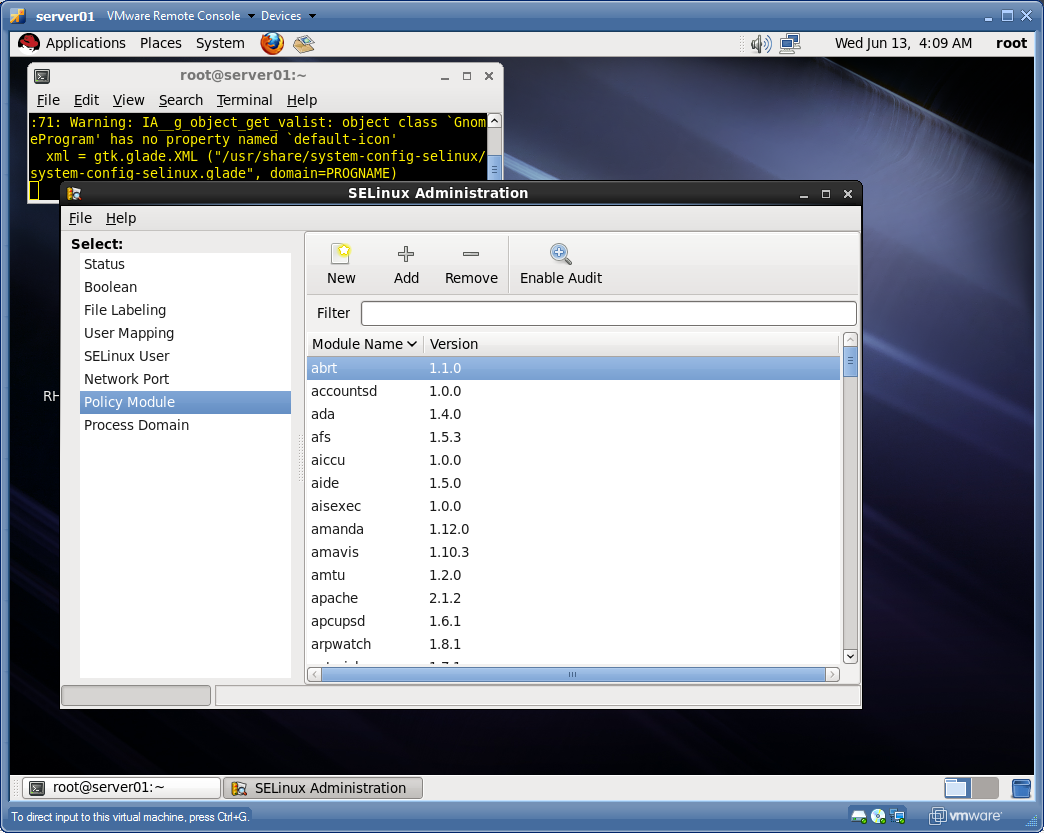
[root@server01 tmp]# yum install policycoreutils-gui -y

# system-config-selinux


Note to self : Need more selinux examples , and ACL advanced examples (mask, etc)


Friday, June 8, 2012

Chapter 3 Networking Primer - part 2


Basics of networking configuration for RHEL6 :

Good reference article : http://www.linuxtopia.org/online_books/rhel6/rhel_6_deployment/rhel_6_deployment_s1-networkscripts-interfaces.html

Classful network

http://en.wikipedia.org/wiki/Classful_network


ClassAddress RangeSupports
Class A1.0.0.1 to 126.255.255.254Supports 16 million hosts on each of 127 networks.
Class B128.1.0.1 to 191.255.255.254Supports 65,000 hosts on each of 16,000 networks.
Class C192.0.1.1 to 223.255.254.254Supports 254 hosts on each of 2 million networks.
Class D224.0.0.0 to 239.255.255.255Reserved for multicast groups.
Class E240.0.0.0 to 254.255.255.254Reserved for future use, or Research and Development Purposes.

Short for Internet Protocol, IP is an address of a computer or other network device on a network using IP or TCP/IP. For example, the number "166.70.10.23" is an example of such an address. These addresses are similar to an addresses used on a house and is what allows data to reach the appropriate destination on a network.

There are five classes of available IP ranges: Class A, Class B, Class C, Class D and Class E, while only A, B, and C are commonly used. Each class allows for a range of valid IP addresses. Below is a listing of these addresses.


Ranges 127.x.x.x are reserved for the loopback or localhost, for example, 127.0.0.1 is the common loopback address. Range 255.255.255.255 broadcasts to all hosts on the local network.

Networking basic commands and usage examples for 'ping', 'ifconfig' 'arp' 'netstat'  'route' 'ping6' and 'dhclient' :

[root@server01 samba-3.5.6]# ifconfig eth0
eth0      Link encap:Ethernet  HWaddr 00:0C:29:3A:FF:14
          inet addr:192.168.0.12  Bcast:192.168.0.255  Mask:255.255.255.0
          inet6 addr: fe80::20c:29ff:fe3a:ff14/64 Scope:Link
          UP BROADCAST RUNNING MULTICAST  MTU:1500  Metric:1
          RX packets:229283 errors:0 dropped:0 overruns:0 frame:0
          TX packets:3410 errors:0 dropped:0 overruns:0 carrier:0
          collisions:0 txqueuelen:1000
          RX bytes:14921632 (14.2 MiB)  TX bytes:574837 (561.3 KiB)


[root@server01 samba-3.5.6]# ping -c2 127.0.0.1
PING 127.0.0.1 (127.0.0.1) 56(84) bytes of data.
64 bytes from 127.0.0.1: icmp_seq=1 ttl=64 time=0.322 ms
64 bytes from 127.0.0.1: icmp_seq=2 ttl=64 time=0.094 ms

--- 127.0.0.1 ping statistics ---
2 packets transmitted, 2 received, 0% packet loss, time 1001ms
rtt min/avg/max/mdev = 0.094/0.208/0.322/0.114 ms


[root@server01 samba-3.5.6]# arp -a
? (192.168.0.3) at 24:77:03:1f:10:14 [ether] on eth0
? (192.168.0.1) at e4:83:99:57:9a:76 [ether] on eth0
[root@server01 samba-3.5.6]# netstat -nap | head
Active Internet connections (servers and established)
Proto Recv-Q Send-Q Local Address               Foreign Address             State       PID/Program name
tcp        0      0 0.0.0.0:22                  0.0.0.0:*                   LISTEN      1675/sshd
tcp        0      0 127.0.0.1:631               0.0.0.0:*                   LISTEN      1571/cupsd
tcp        0      0 127.0.0.1:25                0.0.0.0:*                   LISTEN      1755/master
tcp        0      0 0.0.0.0:38365               0.0.0.0:*                   LISTEN      1489/rpc.statd
tcp        0      0 0.0.0.0:111                 0.0.0.0:*                   LISTEN      1384/rpcbind
tcp        0      0 192.168.122.1:53            0.0.0.0:*                   LISTEN      1944/dnsmasq
tcp        1      0 192.168.0.12:56738          184.84.210.27:80            CLOSE_WAIT  2268/clock-applet
tcp        0     52 192.168.0.12:22             192.168.0.3:54219           ESTABLISHED 2307/1
[root@server01 samba-3.5.6]#

[root@server01 samba-3.5.6]# route
Kernel IP routing table
Destination     Gateway         Genmask         Flags Metric Ref    Use Iface
192.168.0.0     *               255.255.255.0   U     0      0        0 eth0
192.168.122.0   *               255.255.255.0   U     0      0        0 virbr0
link-local      *               255.255.0.0     U     1002   0        0 eth0
default         192.168.0.1     0.0.0.0         UG    0      0        0 eth0
[root@server01 samba-3.5.6]#

Re-configuring an interface with 'ifconfig' :

[root@server01 samba-3.5.6]# ifconfig eth0 192.169.0.20 netmask 255.255.255.0


To change it back to the settings in the network confuration files :

[root@server01 ~]# service network restart
Shutting down interface Auto_eth0:  Device state: 3 (disconnected)
                                                           [  OK  ]
Shutting down interface eth0:  Error: Device 'eth0' (/org/freedesktop/NetworkManager/Devices/0) disconnecting failed: This device is not active
                                                           [FAILED]
Shutting down loopback interface:                          [  OK  ]
Bringing up loopback interface:                            [  OK  ]
Bringing up interface Auto_eth0:  Active connection state: activated
Active connection path: /org/freedesktop/NetworkManager/ActiveConnection/1
                                                           [  OK  ]
Bringing up interface eth0:                                [  OK  ]
[root@server01 ~]#
[root@server01 ~]#
[root@server01 ~]# ifconfig eth0
eth0      Link encap:Ethernet  HWaddr 00:0C:29:3A:FF:14
          inet addr:192.168.0.12  Bcast:192.168.0.255  Mask:255.255.255.0
          inet6 addr: fe80::20c:29ff:fe3a:ff14/64 Scope:Link
          UP BROADCAST RUNNING MULTICAST  MTU:1500  Metric:1
          RX packets:233048 errors:0 dropped:0 overruns:0 frame:0
          TX packets:3618 errors:0 dropped:0 overruns:0 carrier:0
          collisions:0 txqueuelen:1000
          RX bytes:15175150 (14.4 MiB)  TX bytes:605937 (591.7 KiB)
[root@server01 ~]#

[root@server01 ~]# /etc/init.d/network status
Configured devices:
lo Auto_eth0 eth0
Currently active devices:
lo eth0 virbr0
[root@server01 ~]#

And we tried running apache, and get it to serve other ips, tis not working ?

So ....

[root@server01 ~]# iptables -A INPUT -p tcp --dport 80 -i eth0 -j ACCEPT
[root@server01 ~]#
[root@server01 ~]# iptables -L -n
Chain INPUT (policy ACCEPT)
target     prot opt source               destination
ACCEPT     udp  --  0.0.0.0/0            0.0.0.0/0           udp dpt:53
ACCEPT     tcp  --  0.0.0.0/0            0.0.0.0/0           tcp dpt:53
ACCEPT     udp  --  0.0.0.0/0            0.0.0.0/0           udp dpt:67
ACCEPT     tcp  --  0.0.0.0/0            0.0.0.0/0           tcp dpt:67
ACCEPT     all  --  0.0.0.0/0            0.0.0.0/0           state RELATED,ESTAB                                                                              LISHED
ACCEPT     icmp --  0.0.0.0/0            0.0.0.0/0
ACCEPT     all  --  0.0.0.0/0            0.0.0.0/0
ACCEPT     tcp  --  0.0.0.0/0            0.0.0.0/0           state NEW tcp dpt:2                                                                              2
REJECT     all  --  0.0.0.0/0            0.0.0.0/0           reject-with icmp-ho                                                                              st-prohibited
ACCEPT     tcp  --  0.0.0.0/0            0.0.0.0/0           tcp dpt:80
Chain FORWARD (policy ACCEPT)
target     prot opt source               destination
ACCEPT     all  --  0.0.0.0/0            192.168.122.0/24    state RELATED,ESTAB                                                                              LISHED
ACCEPT     all  --  192.168.122.0/24     0.0.0.0/0
ACCEPT     all  --  0.0.0.0/0            0.0.0.0/0
REJECT     all  --  0.0.0.0/0            0.0.0.0/0           reject-with icmp-po                                                                              rt-unreachable
REJECT     all  --  0.0.0.0/0            0.0.0.0/0           reject-with icmp-ho                                                                              st-prohibited
Chain OUTPUT (policy ACCEPT)
target     prot opt source               destination
[root@server01 ~]#

Still not working, so try ...

[root@server01 ~]# chcon -R --reference=/var/www/html/ /var/www/html/inst/
[root@server01 ~]#

still no dice , so try to shut-off linux firewall ..

[root@server01 ~]# iptables -F
[root@server01 ~]# iptables -L -n
Chain INPUT (policy ACCEPT)
target     prot opt source               destination
Chain FORWARD (policy ACCEPT)
target     prot opt source               destination
Chain OUTPUT (policy ACCEPT)
target     prot opt source               destination
[root@server01 ~]#
So for the record, it was the security context stuff blocking.


[root@server01 ~]# chcon -R --reference=/var/www/html/ /var/www/html/inst/RHEL_6.1_x86_64_Disc_1/
[root@server01 ~]#

# system-config-network


 For network interfaces, the minimal set of configuration tokens is shown below :

[root@server01 ~]# cat /etc/sysconfig/network-scripts/ifcfg-eth0
DEVICE="eth0"

BOOTPROT="static"
# HWADDR="00:0C:29:3A:FF:14"
NM_CONTROLLED="yes"
ONBOOT="yes"
IPV6INIT="no"
TYPE="Ethernet"
NETWORK="192.168.0.0"
NETMASK="255.255.255.0"
IPADDR="192.168.0.12"

GATEWAY="192.168.0.1" (or must be in /etc/sysconfig/network)

Also ...run 'nm-connection-manager' from the cli :


If you save this configuration, a file is written like :

/etc/sysconfig/network-scripts/ifcfg-System_eth0

Four files to be familiar with formatting of , for networking :

1. The hosts file is the static database of hostnames and IP addresses
/etc/hosts

[root@server01 ~]# cat /etc/hosts
127.0.0.1   localhost localhost.localdomain localhost4 localhost4.localdomain4
::1         localhost localhost.localdomain localhost6 localhost6.localdomain6
192.168.0.12 server01

2. The /etc/nsswitch.conf file specifies database search priorities for auth and naming and other services :

[root@server01 ~]# cat /etc/nsswitch.conf
#
# /etc/nsswitch.conf
#
# An example Name Service Switch config file. This file should be
# sorted with the most-used services at the beginning.
#
# The entry '[NOTFOUND=return]' means that the search for an
# entry should stop if the search in the previous entry turned
# up nothing. Note that if the search failed due to some other reason
# (like no NIS server responding) then the search continues with the
# next entry.
#
# Valid entries include:
#
#       nisplus                 Use NIS+ (NIS version 3)
#       nis                     Use NIS (NIS version 2), also called YP
#       dns                     Use DNS (Domain Name Service)
#       files                   Use the local files
#       db                      Use the local database (.db) files
#       compat                  Use NIS on compat mode
#       hesiod                  Use Hesiod for user lookups
#       [NOTFOUND=return]       Stop searching if not found so far
#

# To use db, put the "db" in front of "files" for entries you want to be
# looked up first in the databases
#
# Example:
#passwd:    db files nisplus nis
#shadow:    db files nisplus nis
#group:     db files nisplus nis

passwd:     files
shadow:     files
group:      files

#hosts:     db files nisplus nis dns
hosts:      files dns

# Example - obey only what nisplus tells us...
#services:   nisplus [NOTFOUND=return] files
#networks:   nisplus [NOTFOUND=return] files
#protocols:  nisplus [NOTFOUND=return] files
#rpc:        nisplus [NOTFOUND=return] files
#ethers:     nisplus [NOTFOUND=return] files
#netmasks:   nisplus [NOTFOUND=return] files

bootparams: nisplus [NOTFOUND=return] files
ethers:     files
netmasks:   files
networks:   files
protocols:  files
rpc:        files
services:   files

netgroup:   nisplus
publickey:  nisplus
automount:  files nisplus
aliases:    files nisplus

3. The file /etc/resolv.conf is the standard file for DNS clients to document where DNS servers are (which ones used in name searches, rather) :

[root@server01 ~]# cat /etc/resolv.conf
# Generated by NetworkManager
search ad.savvis.net
nameserver 24.217.0.5
nameserver 24.217.201.67

4.) The network file defines the HOSTNAME along with some other network configuration settings

[root@server01 ~]# cat /etc/sysconfig/network
NETWORKING=yes
HOSTNAME=server01
GATEWAY=192.168.0.1
GATEWAYDEV=eth0


The network applet can be found in the upper right hand area of the GNOME Desktop :